

You catch a sharp, acrid smell, flip over a gadget, and spot it: a dark, scorched patch on the green board inside. Your stomach sinks. Is the whole device toast?
Not always. A lot of burnt boards suffer from a single failed component, a small lifted trace, or surface charring you can actually clean up and fix at home. The trick is knowing what’s repairable and what isn’t.
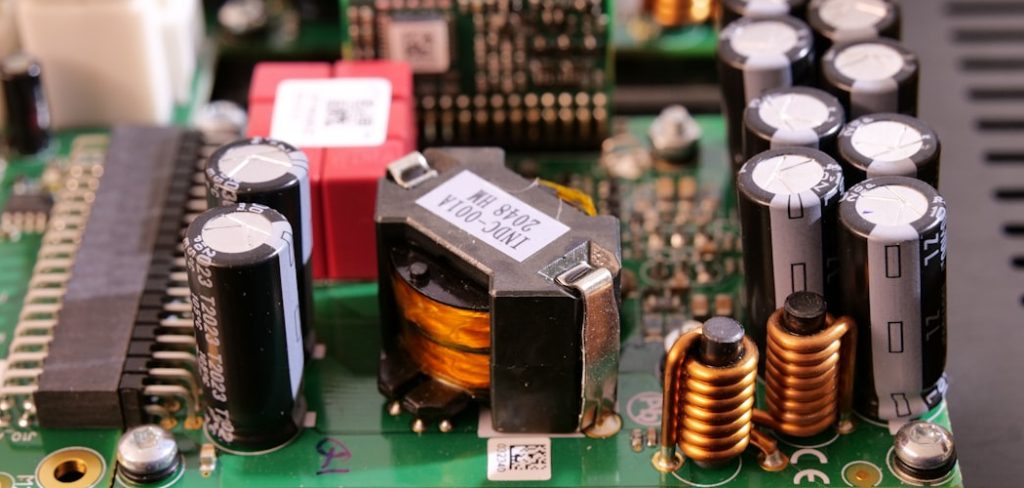
Learning how to repair burnt circuit board damage saves working gear from the landfill and saves you the cost of replacing a whole appliance over one bad part.
This guide walks you through safely powering down, inspecting the damage, testing with a multimeter, removing failed parts, and rebuilding a small trace—while showing you exactly when to stop and replace instead.
Why Fixing a Burnt Circuit Board Matters
Out in the field, electronics fail at the worst times—and a store is usually nowhere close.
For campers and outdoor beginners, that little green board hides inside almost everything you rely on. Portable stoves, battery boxes, solar charge controllers, lanterns, power inverters, and 12-volt coolers all run on circuit boards that can scorch from a short circuit or a stuck component.
When you understand the basics, a dead lantern or a sulking inverter becomes a fixable problem instead of dead weight in your pack. You can spot a burnt smell early, clean carbonized residue, and bridge a small lifted trace to get your gear running again.
It also builds real confidence with field electronics. You troubleshoot calmly, carry the right tools, and stop treating every failure as the end of a device’s life.
Tools and Materials You’ll Need
Set everything out on a clean, well-lit bench before you start, so nothing rolls away mid-repair.
- A soldering iron with a fine tip, plus quality rosin-core solder
- Solder wick and a solder sucker to lift old joints and clear pads
- A digital multimeter for testing continuity, resistance, and shorts
- Isopropyl alcohol (90%+) and a soft brush to clean carbonized residue
- Flux paste for clean, reliable joints
- Thin jumper wire to rebuild a damaged trace
- Fine tweezers and a small flathead screwdriver
- Safety glasses and a fume fan or open window
- A magnifier or loupe to inspect scorched traces and solder pads up close
Optional but handy: a small “helping hands” stand with clips. It holds the board steady at the perfect angle so both your hands stay free for soldering.
Step-by-Step Guide on How to Repair Burnt Circuit Board
Work slowly and in order. Knowing how to repair burnt circuit board damage safely starts with cutting power and understanding what you’re looking at before any soldering iron gets hot.
Step 1 – Unplug and Discharge Everything
Safety comes first, always. Before you touch the board, disconnect the device from any power source and remove its batteries.
If the device plugs into the wall, unplug it and leave it off for several minutes. Mains-voltage equipment can store a dangerous charge inside large capacitors long after you cut the power.
For anything with big capacitors, discharge them carefully using a proper resistor-based discharge tool, never a bare screwdriver. If you’re not confident doing this, stop and treat the device as off-limits.
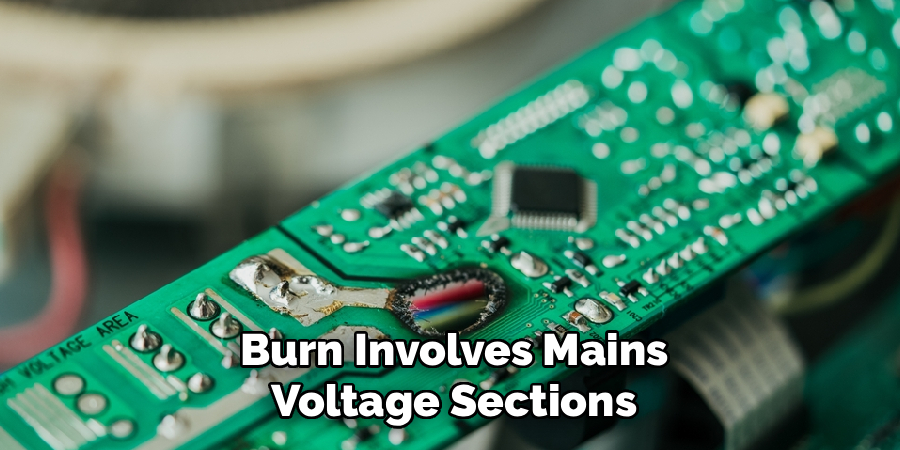
Honestly, if the burn involves mains-voltage sections and you’re not qualified, set it aside. Low-voltage gear—12-volt coolers, battery boxes, lanterns—is where a beginner should focus. Respect the voltage and you’ll stay safe.
Step 2 – Inspect the Damage Closely
Now look hard at what you’re dealing with. Grab your magnifier and good light.
Hold the board at an angle and study the scorched area. Note the burnt smell, the color of the charring, and whether it sits on one small spot or spreads across a wide region.
Light surface soot on a couple of solder pads is promising. Deep, crater-like damage with a carbonized board and delaminated layers is a different story.
Look for a single blackened component—often a resistor, capacitor, or diode—that took the hit. Many burns trace back to just one failed part.
If the fiberglass layers have separated, traces are widely destroyed, or a safety-critical section is cooked, stop here and replace the device. Some damage simply isn’t worth chasing.
Read More: How to Repair Levolor Blinds.
Step 3 – Clean the Carbonized Residue
Carbon conducts electricity, so leftover char can cause a fresh short circuit even after repair. You have to remove it.
Dip your soft brush in isopropyl alcohol and gently scrub the scorched traces and surrounding board. You’ll see black residue lift away and the green surface reappear underneath.
Work in small circles and wipe with a lint-free cloth. The alcohol evaporates fast and leaves no film, which is exactly what you want.
Pay close attention around each solder pad. Char loves to hide in the tiny gaps between pads and component legs.
Keep cleaning until the area looks matte and dry, not glossy with carbon. A clean board lets you see the true extent of the damage—and gives any new joint a solid surface to grip.
Step 4 – Test Components and Continuity
Time for your multimeter. This is detective work, and it’s oddly satisfying.
Set the meter to continuity mode and check the traces around the burn. A clean trace beeps; a broken or lifted trace stays silent. Mark every break you find.
Switch to resistance mode and test the suspect resistor, capacitor, or diode against its printed value. A burnt resistor often reads wildly off or fully open. A shorted diode conducts both directions when it shouldn’t.
Compare readings to the markings on each part. Never guess a component’s value when the label is gone—without markings or a schematic, you can’t safely replace it.
Probe carefully and note what fails. A clear map of broken traces and dead parts guides every move you make next.
Step 5 – Remove the Damaged Component
Once you’ve found the culprit, lift it out cleanly. Heat your soldering iron and let it reach full temperature.
Touch the iron to each joint and add a little fresh solder—oddly, more solder helps it flow and release. Use your solder sucker or solder wick to pull the molten solder away from each pad.
You’ll feel the component loosen as the joints free up. Gently rock it out with tweezers; never yank, or you’ll tear a pad off the board.
If a leg fights you, reheat that joint rather than forcing it. Patience protects the surrounding traces.
Once the part is out, clear each pad hole with wick so it’s clean and open, ready to accept a healthy replacement part later.
Read More: How to Repair Small Holes in Plaster Walls.
Step 6 – Repair a Lifted or Burnt Trace
A small destroyed trace is one of the most fixable problems. You’ll bridge the gap with jumper wire.
Find the two solid points on either side of the break. Gently scrape the protective coating off each end with a hobby knife until bright copper shows.
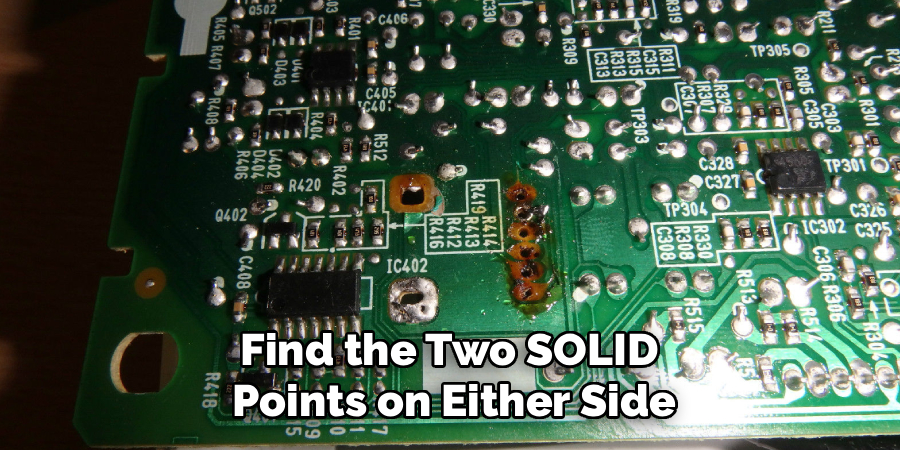
Add a dab of flux, then tin both exposed points with a thin layer of solder. Cut a piece of jumper wire to span the gap with a little slack.
Solder one end down, then the other, holding steady until each joint cools shiny and smooth. A dull, grainy spot signals a cold joint—reheat it until it flows properly.
Tug the wire lightly to confirm it’s secure. You’ve just rerouted the signal around the damage.
Step 7 – Install the Replacement Part
Drop in your new component, matching it exactly to the old one’s markings and orientation.
For diodes and polarized capacitors, line up the stripe or the longer leg correctly—backwards parts can fail fast or cause another short circuit. Double-check before you heat anything.
Push the legs through the cleaned pads and bend them slightly to hold the part in place. Add flux, then touch the iron and feed in just enough solder to form a smooth, volcano-shaped joint.
Trim the excess leg length with flush cutters. Inspect each joint under your magnifier: it should look bright and cleanly attached, not blobby or cracked.
If a joint looks dull or lumpy, reflow it. Clean, solid joints are the backbone of a lasting repair.
Step 8 – Test Before Full Power
Never trust a fresh repair blindly. Verify it first.
Clean the whole area one more time with isopropyl alcohol to remove flux residue. Then run your multimeter over the repaired traces, checking continuity across each fix and confirming no new short circuit between adjacent points.
Inspect for stray solder bridges that could connect pads that shouldn’t touch.
When the cold checks pass, reconnect power briefly and watch closely. Sniff for any returning burnt smell and feel cautiously for components heating up too fast. Keep your hand near the off switch.
If anything smokes, smells, or gets hot quickly, cut power immediately and recheck your work. A calm, steady test confirms whether your repair truly holds—or needs another look.
Read More: How to Repair a Broken Garage Door Spring Safely.
Critical Mistakes When Repairing a Burnt Circuit Board
The most dangerous mistake is tackling mains-voltage damage without the training to handle it. Wall-powered gear can store a lethal charge in its capacitors even when unplugged. If the burn sits in the high-voltage section and you’re not qualified, stop and let a professional handle it—or replace the device entirely.
Another common error is guessing component values. When a part’s markings are burned off and you have no schematic, you can’t know what belongs there. Installing a wrong resistor or capacitor can cause another failure or a fresh short circuit. Never substitute parts blindly.
Many beginners also skip cleaning the carbonized residue. Char conducts electricity, so leftover soot quietly creates new paths for current and undoes your repair the moment you power up.
Bypassing fuses or safety components is a serious mistake too. Those parts exist to protect you. Jumpering across a blown fuse instead of replacing it removes your last line of defense.
Finally, people repair boards that are too far gone. Delaminated layers, widely destroyed traces, or cooked safety-critical sections mean it’s time to replace, not rescue.
Expert Tips
Take a clear photo of the board before you remove anything. When you’re reassembling later, that picture shows you exactly where each component, connector, and wire belongs.
Always match new parts to the printed markings on the old ones. If the label is unreadable and you can’t find a schematic or a donor board with the same part, don’t guess—source the correct component or stop.
Keep your soldering iron tip clean and tinned. A bright, well-tinned tip transfers heat fast, which means quicker joints and far less heat damage to delicate pads and traces.
Work in good light with a magnifier. Most repair failures come from tiny solder bridges or cold joints you simply couldn’t see.
And know your limits. Cleaning, testing, and small trace repairs are great beginner jobs. Mains-voltage rework is not.
Frequently Asked Questions
Can a burnt circuit board always be repaired?
No. Some boards are saveable, and some aren’t. A single failed component or a small lifted trace is often fixable. But severe charring tells a harder story. Replace the board or device when you see:
- Delaminated, separated fiberglass layers
- Widely destroyed or vaporized traces
- Damage to safety-critical or mains-voltage sections
When the core of the board is carbonized, repair isn’t safe or reliable.
How do I find which component burned out?
Start with your eyes, then your multimeter. Look for the blackened, cracked, or bulging part near the burn. Set your meter to resistance or continuity and test suspect resistors, capacitors, and diodes against their printed values. A burnt resistor often reads open or wildly off. A shorted diode conducts both directions. Compare each reading to its marking before deciding.
Is it safe to repair a board from a plugged-in appliance?
Only if you’re qualified to work with mains voltage. Always unplug first and discharge any large capacitors with a proper resistor-based tool, since they hold a dangerous charge even when off. For beginners, stick to low-voltage gear like 12-volt coolers, lanterns, and battery boxes. If the burn sits in the high-voltage section, let a professional handle it.
What removes the black residue on a burnt board?
Isopropyl alcohol, 90% or higher, is your best friend here. Dip a soft brush, gently scrub the carbonized area, and wipe with a lint-free cloth. The char lifts away and the board surface reappears. This matters because carbon conducts electricity, so leftover soot can cause a fresh short circuit. Keep cleaning until the spot looks matte and dry, not glossy.
Why does my repaired board still smell burnt or get hot?
That’s a warning sign—cut power right away. A returning burnt smell or fast-heating part usually means a wrong component, a hidden short circuit, or a solder bridge connecting pads that shouldn’t touch. Recheck your continuity readings, inspect for stray solder under a magnifier, and confirm every new part matches the original markings and orientation before trying power again.
Conclusion
A scorched board with that nasty burnt smell doesn’t have to mean a dead device and a trip to the store. Once you understand how to repair burnt circuit board damage step by step, you can rescue plenty of gear right on your workbench.
The routine is steady and logical: cut the power and discharge any capacitors, inspect the damage closely, clean away carbonized residue, test components and continuity with your multimeter, remove the failed part, bridge a small lifted trace with jumper wire, install a matching replacement, and test carefully before full power.
Just as important, you’ve learned where to stop. Delaminated layers, widely destroyed traces, mains-voltage burns, or cooked safety parts mean it’s time to replace, not repair. And you never guess component values or bypass a fuse.
So set up good lighting, lay out your tools, and take it one careful joint at a time. When your repaired gadget powers up cool and steady, you’ll feel that quiet pride of fixing it yourself—and knowing exactly when to play it safe instead.