

That sudden flicker, the annoying buzz, or a bulb that simply won’t turn on can feel like the end of the road. But here’s a secret most people don’t know: many “dead” LED bulbs aren’t truly dead. They just have a tiny fault you can fix at your kitchen table with basic tools. Learning how to repair LED light bulb units saves you money and keeps perfectly good materials out of the trash.

Whether you’re a homeowner, a renter, or someone who loves a good hands-on project, this skill is easier than you think. You don’t need an electrician’s license or fancy gear. You just need patience and a little guidance. This guide will walk you through diagnosing, opening, and fixing a faulty LED bulb step by step.
Why Learning to Repair an LED Light Bulb Matters
Replacing bulbs adds up fast, especially when you have a house full of fixtures. A single quality LED can cost a fair bit, and tossing it after one failure feels wasteful. When you repair instead of replace, you cut spending and reduce electronic waste at the same time.
There’s also real satisfaction in fixing something with your own hands. Beginners often assume electronics are too complicated to touch, but LED bulbs are surprisingly simple inside. Once you understand the basic parts, like the driver and the diode board, the mystery disappears.
For renters, this skill means quick fixes without waiting on a landlord. For DIY enthusiasts, it’s a gateway into bigger electronics projects. Either way, you gain confidence and independence every time a bulb flickers back to life.
Tools and Materials You’ll Need
You don’t need a workshop to tackle this job, just a few common items. Start with a small flathead screwdriver or a thin putty knife to pry the bulb open. A soldering iron with a fine tip helps you fix any broken solder joint, and you’ll want a bit of solder too.
Grab a multimeter for testing the circuit board and checking which component has failed. Needle-nose pliers and a pair of tweezers make handling tiny parts much easier. Keep some isopropyl alcohol nearby for cleaning contacts.
For replacement parts, you might need a new capacitor, a resistor, or an individual LED diode, depending on the fault. A magnifying glass is an optional but handy extra that makes spotting damage far simpler. Always work on a clean, dry, well-lit surface for safety.
Step-by-Step Guide on How To Repair LED Light Bulb
Step 1 – Unplug and Inspect the Bulb
Safety comes first, so make sure the bulb is removed from the socket and completely cool. LED bulbs run cooler than old incandescents, but the heat sink can still hold warmth after use.
Hold the bulb under good light and look it over carefully. Check for a cracked diffuser, scorch marks, or a rattling sound when you shake it gently. These clues tell you a lot before you even open it.
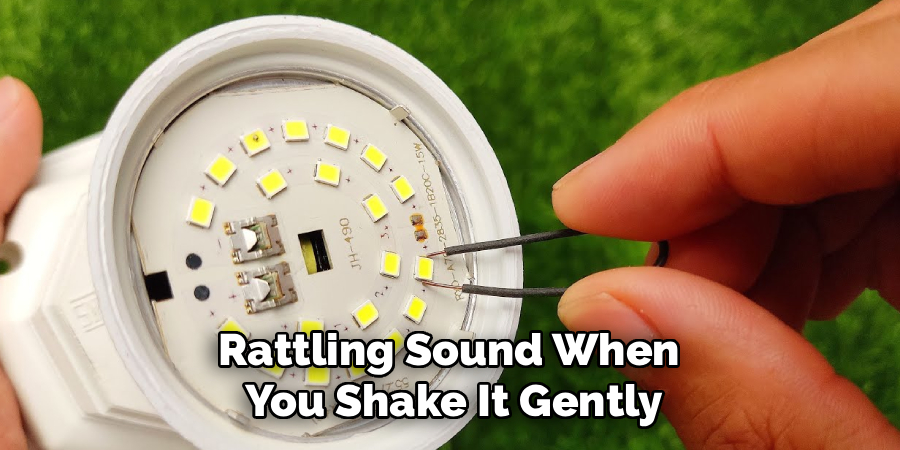
Smell it too. A burnt, slightly chemical odor often points to a fried component inside. Note whether the bulb was flickering, dimming, or fully dark before it failed. Each symptom guides your repair, so take a moment to observe everything carefully before moving on.
Step 2 – Open the Bulb Housing
Most LED bulbs have a plastic diffuser cap that snaps or glues onto the base. Slide your flathead screwdriver or putty knife into the seam where the cap meets the body.
Work slowly around the edge, applying gentle, even pressure. You’ll feel the adhesive give or hear a soft pop as the clips release. Resist the urge to force it, since a cracked diffuser only adds to your repair list.
Once the cap lifts off, set it aside in a safe spot. You’ll now see the round circuit board holding several small LED diodes. Take a photo with your phone at this stage. That picture becomes a helpful reference when you reassemble everything later.
Step 3 – Examine the LED Diodes
Look closely at the ring of tiny diodes on the board. Healthy ones look uniform and clean, while a failed diode often shows a small black dot, a burn mark, or a slightly cloudy surface.
Run your fingertip lightly across them to feel for any that sit loose or uneven. A single dead diode can stop the whole string from lighting, much like one bad bulb in old holiday lights.
If you spot a damaged diode, mark it with a tiny dot of marker. This is one of the most common faults you’ll find, and the good news is it’s very fixable. Knowing how to repair LED light bulb diodes opens the door to rescuing dozens of bulbs over time.
Step 4 – Test the Circuit Board
Now grab your multimeter and set it to continuity or diode mode. Touch the probes to each diode’s two contact points, one at a time, working your way around the board.
A working diode usually shows a reading and may even glow faintly. A dead one gives no response at all. This testing pinpoints exactly which component failed, so you don’t waste time guessing.
While you’re here, inspect the solder joint under each diode. Look for dull, cracked, or grainy spots that suggest a weak connection. The board’s faint smell of warm electronics is normal, but any blackened area signals trouble. Jot down every faulty point you find before reaching for your soldering iron.
Step 5 – Inspect the LED Driver and Capacitor
Flip the board over or look at the base section to find the LED driver. This little circuit controls the power feeding your diodes, and it’s a frequent failure point.
Search for a bulging or leaking capacitor, which often looks swollen on top or has crusty residue around its base. A blown capacitor commonly causes a flickering bulb or one that refuses to start. Replacing it is straightforward once you spot it.
Check the resistors and other small parts nearby for scorch marks too. The driver area carries the most electrical stress, so it earns the most wear. Use your multimeter to confirm whether each suspect part still functions before you decide to swap anything out.
Step 6 – Repair or Replace Faulty Components
Heat up your soldering iron and let it reach working temperature. To remove a bad diode or capacitor, gently melt the old solder joint and lift the part free with tweezers.
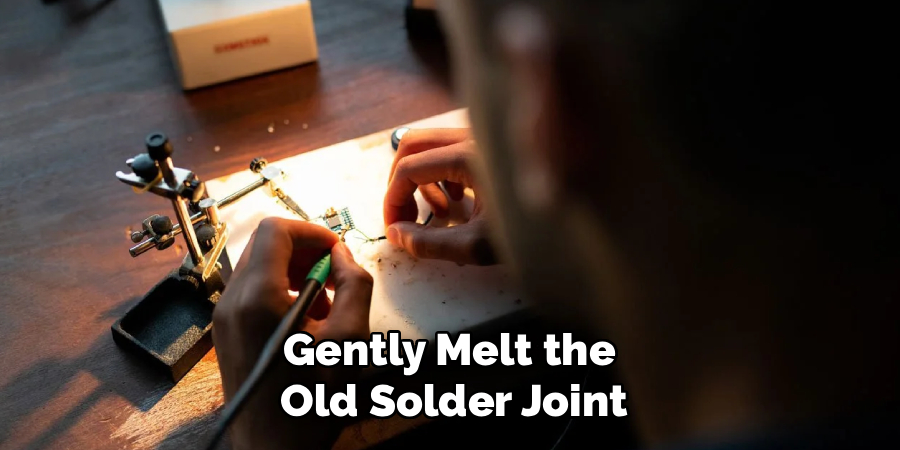
Clean the pads with a little isopropyl alcohol so fresh solder bonds well. Place your new component in the same orientation as the old one, matching the polarity carefully. A backward diode simply won’t light.
Touch the iron to the joint, feed in a small amount of solder, and let it cool into a shiny, smooth bead. Work quickly so you don’t overheat the delicate circuit board. Once your repairs are done, double-check each connection visually to confirm everything sits flat and solid.
Step 7 – Reassemble and Test the Bulb
Before closing things up, give the board a final once-over. Make sure no stray solder bits bridge across contacts, since that could short the bulb.
Line up the diffuser cap using the photo you took earlier as your guide. Press it back onto the base until the clips click or the seam closes tightly. If your bulb used adhesive, a thin bead of clear glue holds it firmly.
Screw the bulb into a socket and switch it on. A steady, bright glow means your repair worked. If it still flickers, revisit your solder joints, as that’s the usual culprit. Practicing how to repair LED light bulb units this way builds skill fast, and each success feels genuinely rewarding.
Critical Mistakes When Repairing an LED Light Bulb
The biggest mistake beginners make is skipping electrical safety. Always remove the bulb from power and let it cool fully before opening it. Rushing this step risks burns or shocks, and no repair is worth an injury.
Another common error is overheating the circuit board with the soldering iron. Holding the tip too long lifts the copper pads and ruins the connection permanently. Work in quick, controlled touches instead, and let parts cool between joints.
Many people also install replacement components backward. Diodes and capacitors have polarity, so reversing them stops the bulb from working and can damage other parts. Match the orientation of the old piece every single time.
Forcing the diffuser open too aggressively cracks the plastic, leaving you with an ugly or unusable cap. Patience around the seam saves the housing. Finally, plenty of folks forget to test with a multimeter first, then replace random parts hoping something works. Diagnose before you repair, and you’ll save time, money, and frustration on every project.
Expert Tips
Keep a small parts bin from any bulbs that are truly beyond saving. Those donor boards give you free diodes, capacitors, and resistors for future fixes, which makes every repair cheaper.
When testing, label your findings on a sticky note so you don’t lose track of which component failed. It sounds simple, but it prevents repeat work.
Invest in a temperature-controlled soldering iron once you’re hooked on this hobby. The steady heat protects delicate boards and gives you cleaner joints. Also, work near a window or use a small fan, since solder fumes aren’t pleasant. Finally, take that reference photo every time you open a bulb. Reassembly becomes effortless when you can see exactly where each piece belonged.
Frequently Asked Questions
Is it safe to open an LED light bulb at home?
Yes, as long as you follow basic electrical safety. Always unplug or unscrew the bulb and let it cool first. LED bulbs hold very little residual charge once removed from power, unlike some larger electronics. Work on a dry surface, keep your hands clean, and avoid touching components while the bulb is connected to any source. With these precautions, home repair is quite safe.
Why does my LED bulb flicker even after repair?
A flickering bulb usually points to one of these issues:
- A weak or cold solder joint that needs reheating
- A failing capacitor in the LED driver
- A loose connection on the circuit board
Recheck each joint under good light and confirm every component sits flat. Reflow any dull solder until it shines, and the flicker often disappears completely.
Do I really need a multimeter to fix an LED bulb?
A multimeter isn’t strictly required, but it makes diagnosis far easier and more accurate. Without one, you’re guessing which diode or component failed, which wastes parts and time. The tool lets you test each diode, check the driver, and confirm continuity in seconds. Affordable models work perfectly well for this task, so it’s a smart, inexpensive investment for any DIY enthusiast.
What causes LED bulbs to fail in the first place?
Heat and cheap components cause most failures. Poor heat sink design lets the diodes run hot, which shortens their lifespan dramatically. Cheap capacitors in the LED driver also degrade quickly, leading to flickering or total failure. Voltage spikes from your home wiring can damage parts too. Better-quality bulbs and stable power help, but no bulb lasts forever, which is exactly why repair skills matter.
Can every LED bulb be repaired?
Not always, but many can. Bulbs with replaceable diodes and accessible drivers are great candidates. Sealed or heavily glued units make repair harder, though still possible with patience. If the circuit board itself is badly burned across multiple areas, replacement may be smarter. Start with bulbs that open easily, build your confidence, and you’ll soon judge which ones are worth your time.
Conclusion
Fixing a faulty bulb really does come down to a handful of clear steps: inspect, open, test, repair, and reassemble. Most failures trace back to a single dead diode, a cracked solder joint, or a tired capacitor in the LED driver. Once you know where to look, the whole process feels far less intimidating than it first appears.
The best part is how quickly your confidence grows. Each bulb you rescue saves money, cuts waste, and proves you can handle electronics you once avoided. Keep your tools organized, save spare parts from dead units, and always lead with electrical safety.
So the next time a light starts flickering, don’t reach for the trash can. Grab your screwdriver and multimeter instead. Now that you understand how to repair LED light bulb units from start to finish, you have a practical skill that pays off again and again. Start with one easy bulb this week, and let that small win spark your next project.