

A warm room and a silent cooling unit usually point to one culprit: the thermostat. When your air conditioner stops responding to temperature changes, the thermostat is often the weak link. The good news? You can fix it yourself without calling a technician or spending a fortune.
Most thermostat problems come down to dead batteries, loose wiring, dust buildup, or wrong settings. These are all fixable with basic tools and a little patience.
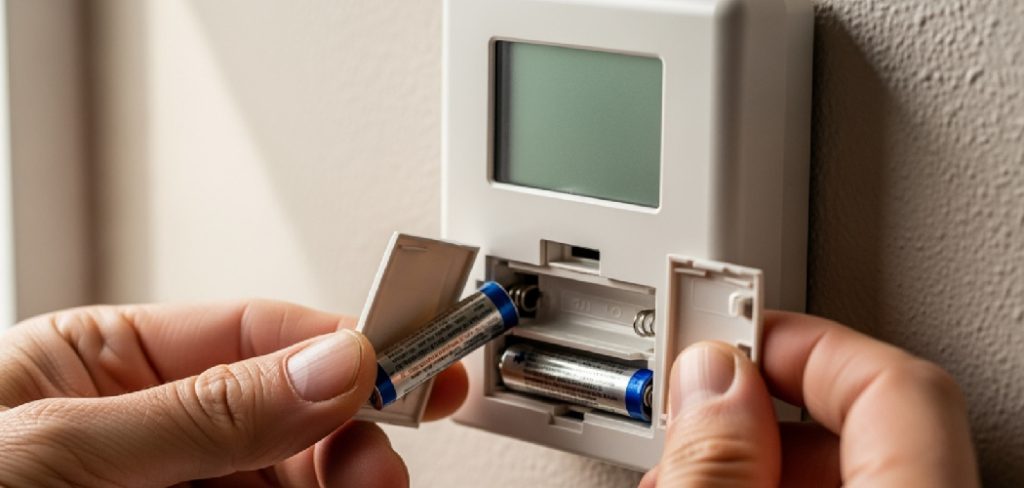
This guide walks you through how to fix air conditioner thermostat issues step by step, so you can restore reliable cooling and take full control of your home’s comfort. By the end, you’ll know exactly what to check, what to replace, and how to avoid common slip-ups.
Why Fix Your Air Conditioner Thermostat Yourself
Hiring a technician for a simple thermostat issue costs more than the repair deserves. A service call alone can run $75 to $200 before any actual work begins. You can often solve the problem in under an hour for the price of a battery or a few wire connectors.
Fixing it yourself puts you in control. You learn how your HVAC system actually works, which makes future problems easier to spot and solve.
You also save time. No waiting days for an appointment while your house overheats. You troubleshoot on your schedule, get instant results, and gain confidence with each repair. That skill pays off across your entire home, not just your cooling unit.
Tools and Materials You’ll Need
Gather everything before you start. The right tools make the job faster and prevent half-finished repairs.
- Screwdriver set – flathead and Phillips for panel and terminal screws
- Fresh batteries – usually AA or AAA, depending on your model
- Soft brush or compressed air – clears dust off the temperature sensor
- Multimeter – tests wiring continuity and confirms power flow
- Wire connectors and stripper – for fixing loose or frayed wiring
- Cotton swab and rubbing alcohol – cleans contacts and terminals
- Level – ensures the unit sits flat on the wall for accurate readings
- Smartphone camera (optional) – snap a photo of the wiring before you disconnect anything
That last tip saves you from guessing during reassembly. One quick photo, and you’ll wire everything back exactly as it was.
Step-by-Step Guide on How to Fix Air Conditioner Thermostat
Step 1 – Cut the Power First
Safety comes before anything else. Head to your breaker box and switch off the circuit that powers your HVAC system. This protects you from electrical shock and prevents damage to the thermostat’s delicate circuitry.
Don’t trust the off switch on the unit alone. Flip the actual breaker and confirm the system is dead by setting the thermostat to cooling. If nothing clicks or hums, you’re clear to work.
You’ll feel safer knowing no current runs through those wires. Take a moment to label the breaker if it isn’t already marked. This single step is where many DIYers rush and regret it later. Slow down here, and the rest goes smoothly.
Step 2 – Check and Replace the Batteries
Start with the easiest fix. Pop off the thermostat cover and locate the battery compartment. Many digital units run on AA or AAA batteries, and a dead set causes blank screens or frozen displays.
Pull the old batteries and insert fresh ones, matching the positive and negative ends correctly. The screen should light up immediately. You’ll often hear a faint beep as the unit powers back on.
If your display was dim or flickering, this likely solves it. Weak batteries cause erratic behavior long before they die completely. Swap them, then test your thermostat settings to see if normal function returns. This quick check resolves a surprising number of complaints.
Step 3 – Clean the Interior and Temperature Sensor
Dust is a silent saboteur. Over time, it coats the temperature sensor and contacts, throwing off readings and making your AC short-cycle or ignore commands.
Use a soft brush or a quick burst of compressed air to clear debris from inside the unit. Pay close attention to the metal coils and the small sensor strip. Then dip a cotton swab in rubbing alcohol and gently wipe the contacts clean.
You’ll notice the difference in how crisply the buttons respond. A clean sensor reads room temperature accurately, which keeps your cooling unit cycling correctly. Let everything dry fully before you reattach the cover. This five-minute cleaning often restores precise control.
Step 4 – Inspect the Wiring
Loose or corroded wiring is a top cause of thermostat failure. With the power off, remove the thermostat from its base plate and examine each wire.
Look for frayed ends, disconnected leads, or terminals that have wiggled loose. Tighten any screws that hold the wires in place. If you see corrosion, snip the damaged end, strip a fresh section, and reconnect it firmly.
Take that smartphone photo now if you haven’t already. Knowing how to fix air conditioner thermostat wiring correctly means matching each colored wire to its labeled terminal. A single misplaced wire stops the whole HVAC system from responding. Snug, clean connections bring the unit back to life.
Step 5 – Test With a Multimeter
Confirm power and continuity before you reassemble. Set your multimeter to test voltage and touch the probes to the appropriate terminals once power is restored briefly.
You’re checking that the thermostat receives the 24 volts most systems need. A reading near zero points to a wiring break upstream or a tripped transformer.
For continuity testing, keep the power off and probe each wire end to end. A steady tone confirms the wire carries signal cleanly. This step removes guesswork. Instead of replacing parts blindly, you pinpoint the exact fault. The multimeter turns a frustrating mystery into a clear, fixable problem you can solve with confidence.
Step 6 – Check and Reset Thermostat Settings
Sometimes the hardware is fine, but the settings are wrong. Make sure the mode is set to “cool” and the target temperature sits below the current room temperature.
Programmable units sometimes hold an old schedule that fights your manual input. Reset the thermostat to factory defaults if the menu offers it. This clears stuck programs and odd configurations.
Listen for the click of the system kicking on after you lower the temperature. That sound tells you the signal reached the cooling unit. Double-check the fan setting too, since “on” versus “auto” changes how air circulates. Correct thermostat settings often solve problems that look mechanical but are simply user-level mix-ups.
Step 7 – Level the Thermostat
An off-kilter mount affects older mechanical thermostats with mercury switches. If your unit tilts, it reads temperature inaccurately and triggers the AC at the wrong moments.
Hold a level against the base and adjust until the bubble centers. Tighten the mounting screws while keeping it straight. Even digital models benefit from a flat, secure mount that holds the sensor steady.
You’ll feel the unit sit firmly against the wall instead of shifting under your fingers. A level thermostat reads your room honestly, which means your HVAC system responds at the right temperatures. This small adjustment prevents the annoying cycle of rooms that never quite hit the comfort you set.
Step 8 – Reassemble and Restore Power
Bring it all back together. Reattach the thermostat to its base, snap the cover into place, and head to the breaker box to restore power.
Give the system a full minute to boot up. Digital displays run a brief startup sequence before they’re ready. Set your desired temperature and wait for the cooling unit to engage.
You should hear the compressor hum and feel cool air within a few minutes. Hold your hand near a vent to confirm steady airflow. If everything responds as expected, your repair is complete. Run the system through a full cycle to be sure it holds the temperature without dropping out or short-cycling.
Critical Mistakes When Fixing an AC Thermostat
The biggest mistake is skipping the power shutoff. People assume a thermostat carries harmless low voltage, but working live still risks shorting the board or shocking yourself. Always kill the breaker first and verify the system is dead before touching wires.
Another common error is disconnecting wiring without labeling it. Those small colored wires look similar, and reconnecting them wrong stops your HVAC system cold or damages components. Photograph the setup before you unhook a single lead. This one habit saves hours of frustration.
Many DIYers also force the wrong batteries or install them backward. A reversed battery leaves the screen blank and convinces you the unit is broken when it isn’t. Check polarity every time.
Overcleaning causes trouble too. Spraying liquid cleaner directly into the unit or scrubbing the temperature sensor too hard damages delicate parts. Use gentle pressure and let alcohol evaporate fully.
Finally, people ignore the settings entirely. They tear into wiring and sensors when the mode was simply set to “heat” or the schedule overrode their commands. Always rule out simple thermostat settings before opening anything up.
Expert Tips
Test your fix in stages. After each repair, restore power and check if the problem clears before moving to the next step. This isolates the actual cause and saves you from replacing parts you didn’t need to touch.
Keep a spare set of batteries on hand year-round. Dead batteries cause more thermostat failures than any wiring issue, and a quick swap beats an emergency mid-heatwave.
Mount your thermostat away from direct sunlight, vents, and doorways. Heat sources near the sensor cause false readings and constant cycling.
If you upgrade, consider a smart thermostat. It alerts you to issues early and gives you remote control over your cooling unit. Small habits like these keep your repairs lasting and your home consistently comfortable.
Frequently Asked Questions
How do I know if my AC thermostat is broken or just needs new batteries?
Start with the simplest test. A blank, dim, or flickering screen almost always means dead batteries, so swap them first. If fresh batteries don’t help, the issue runs deeper. Look for:
- No response when you change settings
- The AC ignoring temperature commands
- Inaccurate room readings
These signs point to wiring, sensor, or internal faults that need closer inspection.
Can I fix my air conditioner thermostat without a multimeter?
Yes, you can handle most basic repairs without one. Battery swaps, cleaning, settings resets, and tightening loose wiring all need no special meter. A multimeter only becomes essential when you suspect a power or continuity problem. It confirms whether the thermostat receives voltage and whether wires carry a clean signal, which removes guesswork from harder electrical diagnoses.
Why does my AC run constantly even after I fix the thermostat?
Constant running usually means the sensor reads the room as warmer than it is. Check for dust on the temperature sensor and clean it gently. Also confirm your fan setting sits on “auto” rather than “on.” If the mount tilts, level it so the unit reads accurately. Persistent issues after these checks may signal a wiring fault or a failing relay.
Is it safe to work on my thermostat wiring myself?
It’s safe when you cut the power first. Switch off the breaker that feeds your HVAC system and confirm the unit is dead before touching any wires. Thermostat wiring runs on low voltage, but live work still risks shorts and component damage. Photograph the wiring before disconnecting it, match colors to labeled terminals, and you’ll work safely and accurately.
How long does a typical thermostat repair take?
Most repairs take 15 to 60 minutes. A battery swap or settings reset takes minutes, while cleaning, wiring fixes, or multimeter testing add time. Gathering your tools beforehand speeds everything up. If you work through each step methodically and test as you go, you’ll usually have your cooling unit running again within the hour, no technician required.
Conclusion
A faulty thermostat doesn’t have to mean a hot house and an expensive service call. With a screwdriver, fresh batteries, and a little focus, you can diagnose and solve most issues yourself in under an hour.
Remember the order that works: cut the power, check the batteries, clean the sensor, inspect the wiring, test with a multimeter, and confirm your settings. Each step rules out a cause and brings you closer to cool, reliable air. Test as you go so you fix only what’s actually broken.
You’ve now got the full process to fix air conditioner thermostat problems with confidence, and that skill stays with you for every future hiccup. The first repair feels like the hardest. After that, you’ll spot trouble early and handle it fast.
Keep your tools ready, store a spare set of batteries, and trust what you’ve learned here. Your home’s comfort is back in your hands, exactly where it belongs.